> For the complete documentation index, see [llms.txt](https://academy.decisionrules.io/llms.txt). Markdown versions of documentation pages are available by appending `.md` to page URLs; this page is available as [Markdown](https://academy.decisionrules.io/rule-types/integration-flow.md).
# Integration Flow
This page introduces the DecisionRules Integration Flow feature, highlighting its key capabilities and applications.
## Integration Flow Basics
Similar to the Decision Flow, this rule type is composed of a sequence of other rules. It orchestrates independent logical steps within a consistent process. Because they share a similar structure, Integration Flows are built as well by placing nodes on a canvas and connecting them with lines, utilizing a variety of available node types.
However, the Integration Flow also features unique functionalities. The main distinction between a Decision Flow and an Integration Flow is that the former is designed for **synchronous** execution, while the latter is designed for **asynchronous** execution. Let’s briefly define these two concepts:
* **Synchronous:** This is a communication model where results are updated immediately (in real-time). When System A sends a request to System B, System A waits until the process is finished before continuing.
* *Example*: This is like making a **phone call** to resolve an issue. You must stay on the line the entire time, but if the operator is efficient, the problem is resolved by the time you hang up. This is highly effective when results are generated in milliseconds.
* **Asynchronous:** This is a communication model where the request is sent, but the results are updated at a later time. When System A sends a request to System B, System A can continue with its usual processes and receive a notification only when the result is ready.
* *Example*: This is like sending an **email** to resolve an issue. After sending it, you can ignore the request and continue with other tasks. Once you eventually receive a response, the problem is resolved. This model provides more freedom but typically involves a longer total wait time.
Therefore, consider these aspects to select the flow for your project:
| Quality | Decision Flow | Integration Flow |
| ------------ | --------------------------------------------------------------------------- | --------------------------------------------------------------------- |
| Primary Goal | Daily business decisions for real-time response and high-performance logic. | Integration with external systems, long-running and batch processing. |
| Performance | Optimized for millisecond response times. | Optimized for reliability and connectivity. |
## Integration Flow Designer
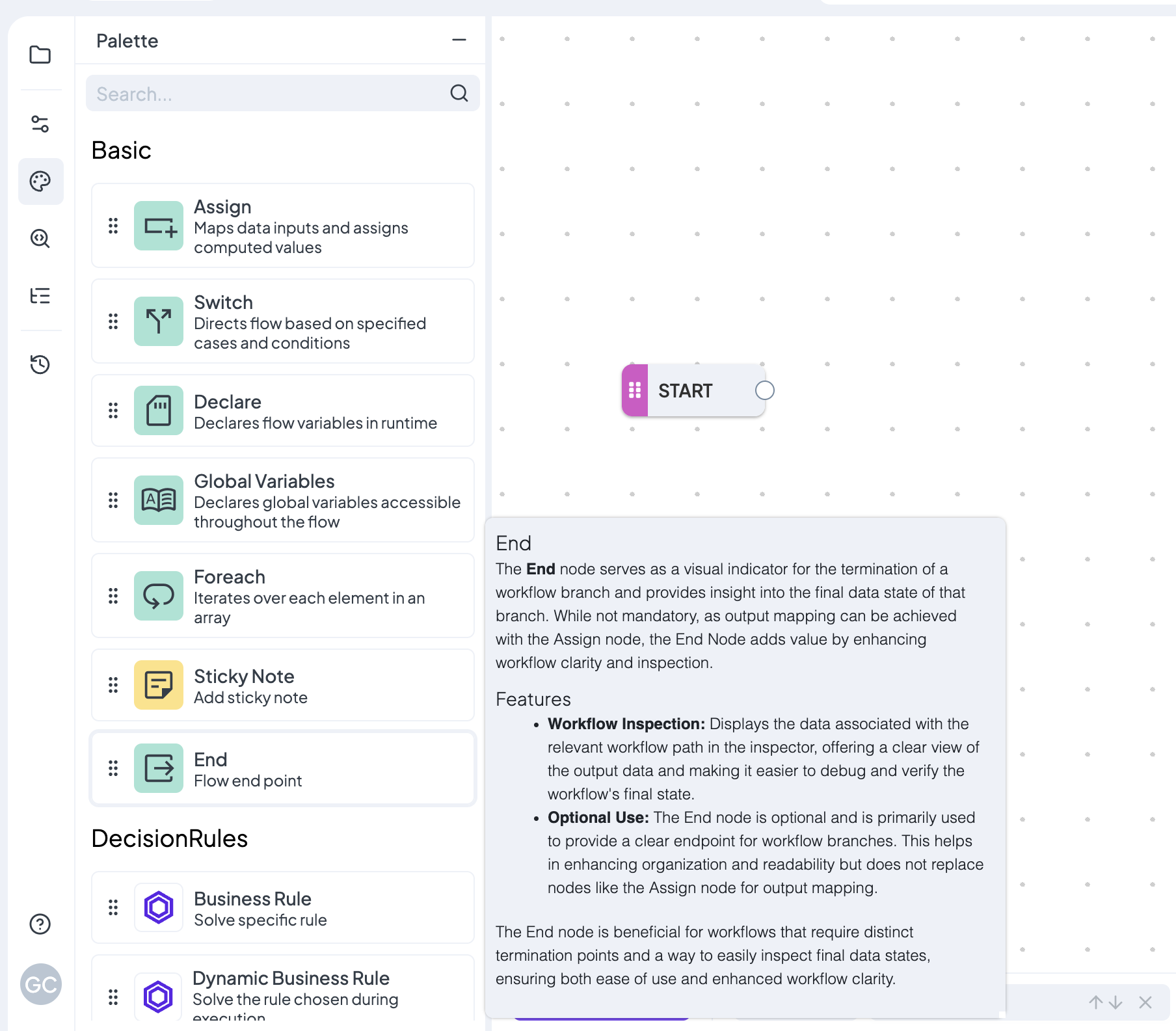
The Designer features a canvas with a single **Start** node. On left side, you’ll find several tabs, with the **Palette** being the most important for now. The Palette lists all available node types with brief descriptions. To use a node, simply drag it from the palette onto the canvas.
Once a node is on the canvas, click it to open its detail settings. Each node type has different configuration options depending on its functionality. For detailed information on each node type, check the [**Workflow Nodes Overview**](https://docs.decisionrules.io/doc/rules/flow/flow-nodes-overview).
## Parallel Jobs
#### Jobs
For the sake of clarity, we refer to the execution of a Decision Flow as "solving a rule," whereas the execution of an Integration Flow is referred to as **running a job**. So, Jobs are the processes of Integration Flows and can take anywhere from a few minutes to several hours to complete.
#### Parallel
Because of the asynchronous nature mentioned above, the Integration Flow is enhanced with a powerful capability: it can run jobs in **parallel**. This means that inputs are not necessarily executed sequentially; instead, the rule can handle multiple different jobs at once. In summary, an Integration Flow:
* Can be triggered by multiple external requests at the same time.
* Can trigger multiple external requests (e.g., calling three different credit bureaus) simultaneously.
This significantly reduces the total "waiting time" for the user or the system calling the flow.
{% hint style="info" %}
Note that the number of parallel jobs available for your Integration Flows depends on your specific subscription plan.
{% endhint %}
## Connectors
While you can make standard REST API calls from any rule using functions to fetch external data, Integration Flows offer specialized nodes to connect directly and more efficiently with your databases. These are our *Data & Integration Nodes* (or Connectors).
We support a wide range of relevant databases for our connectors and continuously expand this list based on client requests.
The most important aspect of implementation is as follows: "*To use these nodes, you must first connect your database to your DecisionRules Space*".
#### Steps to connect your database
1. Go to left-side menu and click on **Space**
2. On the new menu opened next to it, select **Connectors**
3. Click on the main purple frame: "Add Connector"
4. Select among the database options
5. Fill in the information required
6. Test the connector using the homonymous button **Test Connector**
7. Press **Create**
## Webhooks
Since Integration Flows run as background Jobs, **Webhooks** are the primary mechanism for receiving notifications and output data once a process is finished. Instead of manually polling the [Jobs API](https://www.google.com/url?sa=E\&q=https%3A%2F%2Fdocs.decisionrules.io%2Fdoc%2Fapi%2Fjobs-api) to check if a task is done, a webhook automatically "pushes" the result to your system the moment the job reaches a final state.
* **Outbound Notifications:** You can use a Webhook to send a "callback" to another system. This is ideal for notifying a frontend application that a long-running process has finished or for logging results in an external monitoring tool.
* **Event-Driven Architecture:** This makes DecisionRules a central hub in an event-driven architecture, where your entire tech stack can act and react to changes in harmony.
{% hint style="info" %}
For more information about the Webhooks, see our dedicated [documentation](https://docs.decisionrules.io/doc/space/webhooks) section.
{% endhint %}

.gif?alt=media&token=dca6fe9b-ee6b-4130-8fef-a75b5c235a4c)